
You have finally decided to automate your floor cleaning. But every time you search for a robot vacuum, you hit a wall of confusing specs and prices that climb into the thousands. You want a machine that vacuums and mops without making a dent in your savings. The struggle is real, and the market is flooded with options that promise the moon but deliver mediocre puddles. This guide cuts through the noise. We will show you exactly what to look for when shopping for the best robot mop combos under 500, which models actually perform on hardwood and tile, and how to avoid wasting money on features you will never use.
What Makes a Robot Mop Combo Worth Buying Under $500?
True Mopping vs. Damp Swiffer-Style Mopping
Under $500, you need to distinguish between “drag a wet cloth” bots and genuine scrubbing systems. True mopping uses a vibrating pad or spinning mop head that actively agitates dirt. Cheaper models simply drag a damp cloth, which works for dust but fails on dried spills. Look for models with a water tank that sits on the bot (not just a reservoir in the dock) and a pad that oscillates or spins at a high RPM.
Lidar vs. Camera Navigation in This Price Range
Lidar navigation is the gold standard under $500. It creates a map of your home using invisible lasers, allowing the robot to work efficiently in the dark and remember room layouts. Camera-based navigation (vSLAM) can struggle in low light and often costs more to implement effectively. Stick with Lidar for reliable path planning, better coverage, and fewer missed spots on your floors.
Battery Life and Coverage Area Realities
Most combos under $500 offer 90 to 150 minutes of runtime. That translates to roughly 1,000 to 1,500 square feet per charge on hard floors. If your home is larger, you will need a model that supports auto-resume charging — where the bot returns to charge and then continues cleaning exactly where it left off. Without this feature, large homes will require manual intervention to finish the job.
Which Features Should You Prioritize at This Budget?
Object Avoidance and Drop Protection
Under $500, you cannot expect premium AI that identifies cables and socks every time. However, you should demand basic infrared or 3D structured light sensors that prevent the bot from tumbling down stairs or ramming into furniture legs. Models without these sensors often get stuck under low sofas or cause damage to baseboards. Check the specifications for “cliff sensors” and “obstacle detection.”
App Control and Smart Home Integration
Every good combo under $500 should connect to Wi-Fi and allow you to start, stop, and schedule cleaning from your phone. More importantly, look for integration with Alexa or Google Assistant so you can say “start cleaning the kitchen” without pulling out your phone. The app should also let you set no-go zones (areas where the bot should not enter) and adjust suction power per room.
Maintenance and Replacement Part Costs
Beware of cheap robots that use proprietary filters or mop pads that cost a fortune to replace. The best robot mop combos under 500 use standard parts that are widely available. Check the price of replacement side brushes, filters, and mop cloths before you buy. A $300 robot that requires $100 in parts every six months is not a bargain. Stick with models where consumables are under $25 per set.
How Do Robot Mop Combos Perform on Different Floor Types?
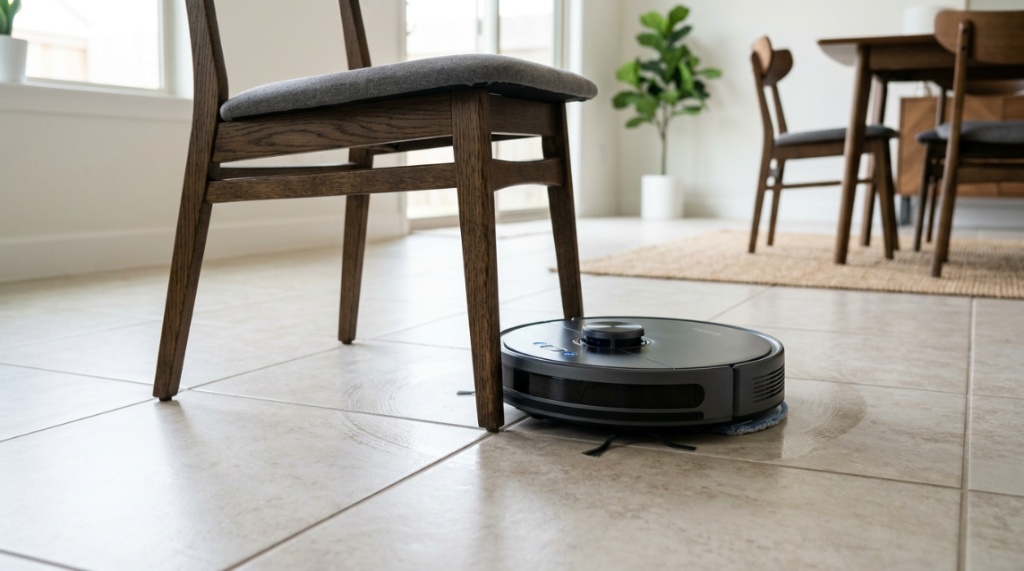
Hardwood Floors: The Sweet Spot for Mopping
Hardwood floors are where these combos shine. A good under-$500 model will use a controlled water flow system that does not dump excessive water onto the wood. Look for adjustable water levels (low, medium, high). You want enough moisture to pick up dirt but not so much that it seeps into the gaps between planks. Always use the manufacturer’s cleaning solution, not vinegar, which can damage the finish over time.
Tile and Grout: Scrubbing Power Matters
Tile floors, especially in kitchens and bathrooms, require more agitation to clean grout lines. Spinning mop heads are far superior to flat pads here. They rotate at high speed to dislodge dirt from the textured surfaces. If you have lots of tile, prioritize models with dual spinning pads over single vibrating plates. These are more effective at cleaning grout without leaving streaks.
Area Rugs and Carpets: Vacuuming Over Mopping
Most combos under $500 handle low-pile rugs well. They automatically boost suction when they detect carpet and lift the mop pad slightly so it does not wet the rug. However, thick shag or high-pile carpets can confuse the sensors, causing the mop pad to drag across the fibers and leave them damp. For homes with mixed flooring, choose a model with a carpet detection sensor that physically lifts the mop pad at least 8mm off the ground.
Can a Cheap Robot Mop Combo Replace a Manual Mop Entirely?
Daily Maintenance vs. Deep Cleaning
A robot mop combo under $500 is excellent for daily maintenance — it will keep your floors looking clean by removing dust, crumbs, and light spills. It cannot replace a manual deep scrub for dried food, grease, or sticky residues. Think of it as your daily janitor, not your weekly deep cleaner. You will still need a traditional mop for heavy-duty messes, but you will use it far less often.
Edge and Corner Cleaning Limitations
Because robots are round and their mop pads do not extend past the chassis, they will leave a small gap (usually 1–2 inches) along walls and in corners. Some models include a side brush that sweeps debris toward the vacuum intake, but mopping edges remains a weak point. Do not expect spotless baseboards. Accept that you will need to hand-wipe corners occasionally, especially in kitchens where grease accumulates,While budget-friendly models excel at handling daily spills and dust in residential spaces, they lack the commercial-grade tanks and industrial durability required for spaces that require cleaning in a retail environment. For home use, however, these under-$500 options offer incredible value
Water Tank Size and Refill Frequency
Most combos under $500 have water tanks between 200ml and 300ml. That is enough for about one full cleaning cycle on a medium-sized home (1,000-1,200 sq ft) on low water output. If you use the highest water setting, you may need to refill mid-cycle. If you have a larger home or want a truly hands-off experience, consider models with a self-emptying dock that also refills the water tank. These exist under $500 but are rare and usually from newer brands.
What Are the Best Robot Mop Combos for Small Apartments?
Compact Designs That Fit Under Furniture
For apartments under 800 square feet, you want a robot that is less than 3.5 inches tall. This allows it to slide under sofas, beds, and entertainment centers. Many sub-$500 models are around 3.8 inches, which is a common height for clearance. Measure the gap under your furniture before buying. A robot that cannot go under your couch will waste a lot of space you cannot clean automatically.
Dual Functionality Without Extra Devices
In small apartments, you do not want a robot that requires a massive self-emptying dock that takes up precious floor space. Stick with a simple base that charges the robot and holds a small dustbin. Some models under $500 now include a self-empty feature in the dock itself, but these are bulkier. For apartments, a clean, compact charging pad is usually the better fit.
Quiet Operation for Shared Walls
Noise levels matter in thin-walled apartments. The quietest robot mop combos under $500 operate at around 55-60 dB on standard mode, which is quieter than a normal conversation. Avoid budget models that use noisy fans or cheap motors, as these can irritate neighbors. Look for a “silent” or “quiet” mode in the app that drops noise to around 50 dB, suitable for overnight or work-from-home cleaning.
How to Compare the Top Models in the Under $500 Range
Comparing Suction Power (Pa) and Mop Pressure
Suction power for under-$500 robots typically ranges from 2,500 Pa to 4,500 Pa. Higher is better for carpets and pet hair, but on hard floors, 2,500 Pa is sufficient. Mop pressure is a different metric — look for a model that applies at least 5N of downward pressure on the mop pad. This ensures the pad presses into the floor rather than just skimming over it. Models with lower pressure leave more dirt behind.
Water Flow Control and Pad Quality
The best combos offer at least three water flow levels (low, medium, high) that you can adjust per room. For example, you might want low flow on hardwood and high flow on tile. Also check whether the mop pads are washable or disposable. Washable pads are more economical and eco-friendly, but they need to be replaced every 3–6 months when they lose their absorbency. Disposable pads are convenient but cost more over time.
Mapping and Multi-Floor Support
If you live in a multi-story home, ensure the robot supports multiple maps. Under $500, many Lidar-based models can save 3 to 5 different floor plans. When you move the robot between floors, it automatically detects which map to use. This is a critical feature that saves you from having to remap every time you carry the robot upstairs. Without it, you are stuck cleaning one floor only.
Which Accessories and Consumables Should You Budget For?
Replacement Mop Pads and Filters
Plan on replacing mop pads every 3 to 4 months if you wash them regularly. Filters (HEPA or foam) need replacing every 2 to 3 months. Side brushes wear out faster, especially if you have many corners or hard edges — expect to change them every 2 months. Summed up, annual consumables cost between $60 and $120 depending on the brand. Factor this into your total cost of ownership.
Cleaning Solutions vs. Plain Water
Most manufacturers recommend using their branded cleaning solution to prevent clogging the water nozzle and to extend the life of the mop pad. Using plain water is fine for daily cleaning, but for sanitizing, you should use a mild cleaner. Never use bleach, vinegar, or alcohol in the tank — these can damage internal seals and void the warranty. A bottle of cleaning solution usually costs $10 to $15 and lasts 2–3 months.
Dustbin Capacity and Self-Empty Options
Under $500, standard dustbins hold around 300 to 400ml. That is enough for two or three cleaning cycles in a small home but may fill up after one pass in a home with pets. Some models offer a self-emptying dock that empties the bin into a bag inside the base. This is a premium feature but is becoming available under $500 from brands like Roborock and iRobot in sales events.
Why Do Some Users Regret Buying Cheaper Robot Combos?
Poor Navigation Leads to Frustration
The most common regret among buyers is buying a robot that gets stuck frequently. Under $200, many models lack effective obstacle detection and will bump into furniture, get tangled in cords, or stop on a rug fringe. This defeats the purpose of automation. The best robot mop combos under 500 generally avoid this trap by using better sensors and smarter navigation algorithms that actually learn your home layout over time.
Weak Mopping Performance Disappoints
The second biggest complaint is that the mopping function leaves streaks or does not pick up dirt. This happens when the robot uses a cheap, non-vibrating pad that simply slides across the floor. If you want real mopping, you must choose a model with an active scrubbing mechanism. Do not assume all combos are created equal. Read user reviews specifically about mopping, not just vacuuming.
App Reliability and Connectivity Issues
A few budget-friendly models have apps that are glitchy, crash frequently, or lose Wi-Fi connection. This turns a smart device into a dumb one. Check recent app store ratings for the brand’s companion app before purchasing. Stick with brands that have a track record of updating their software, such as Roborock, Dreame, Ecovacs, or iRobot. These companies invest in their app ecosystems.
How to Extend the Lifespan of Your Robot Mop Combo
Regular Cleaning of Sensors and Wheels
Dust and hair accumulate on the cliff sensors, charging contacts, and wheels. Clean the cliff sensors with a dry cotton swab once a month. Remove hair from the main brush and side brush weekly, especially if you have pets. A clean robot performs better and lasts longer. Neglecting these simple maintenance tasks is the number one reason robots fail prematurely.
Proper Storage and Charging Habits
Always keep the robot on its charging dock when not in use. Allowing the battery to drain completely shortens its lifespan. Most modern robots use lithium-ion batteries that benefit from being topped off. Also, store the robot in a dry, temperature-controlled area — extreme heat or cold can damage the battery and electronics. Avoid leaving the robot in direct sunlight.
Software Updates and Firmware Upgrades
Manufacturers often release firmware updates that improve navigation, add new features, or fix bugs. Make sure your robot is connected to Wi-Fi and check for updates in the app every few months. These updates can significantly improve performance without costing you anything. Ignoring them means missing out on free improvements to your machine’s cleaning capability.
When Should You Consider Spending More Than $500?
If You Have Heavy Pet Hair or Long Carpets
Robots under $500 handle light to moderate pet hair well, but heavy shedding from double-coated breeds can overwhelm the small dustbin. If you have a Golden Retriever or a home with wall-to-wall carpet, spending $600-$800 gets you a model with a larger bin, stronger suction, and a rubber brush that resists hair tangling. The upgrade might be worth it for your specific needs.
If You Want a Fully Automated Mopping Dock
The truly hands-off experience — where the robot washes and dries its own mop pads — starts around $700 for the dock and unit together. Under $500, you will be washing mop pads manually. If that chore bothers you, save up for a model like the Roborock Q Revo or Ecovacs T20. For most people, washing a pad every 2 or 3 days is a manageable trade-off for the price savings.
If you are still narrowing down your options, you can check a curated list of the best robot mop combos under 500 that focuses on affordable models proven to work in real homes. These selections are based on performance, durability, and user feedback from people who actually live with these machines every day.
Frequently Asked Questions
Are robot mop combos under $500 good for hardwood floors?
Yes, most models under $500 are safe for sealed hardwood floors. They use controlled water flow that prevents water damage. For unsealed or waxed wood floors, it is better to avoid any wet mopping robot altogether, as moisture can cause warping.
How often do I need to replace the mop pads?
Washable pads typically last 3 to 6 months before losing absorbency. Disposable pads should be replaced after every 2 to 3 cleaning cycles. Follow the manufacturer’s recommendations for the best results.
Can a robot mop combo vacuum carpets and mop floors at the same time?
No. A robot cannot vacuum carpets and mop simultaneously because the mop pad would wet the carpet. Most models automatically lift the mop pad when they detect carpet and increase suction power. The mopping function is disabled on carpet surfaces.
Do I need to be home when the robot is mopping?
You do not need to be home, but you should ensure the water tank is full before starting. If the tank runs out mid-cycle, the robot will stop mopping but continue vacuuming. Some models return to the dock to refill automatically, but this is rare under $500.
Will the robot mop remove dried-on stains?
For light dried-on stains, a robot with spinning mop pads and high water flow can remove them after 2–3 passes. For heavy, crusted-on food or grease, you will need to pre-treat or manually scrub the spot. Robots are best for maintenance, not extreme messes.
How do I prevent the robot from mopping my area rugs?
Use the app to set virtual no-go zones around your area rugs. The robot will avoid these mapped areas entirely during mopping. This is the safest method because it prevents any risk of moisture damaging your rugs.
What is the average battery life for a robot mop combo under $500?
Battery life typically ranges from 90 to 150 minutes on a single charge. This is enough to clean about 1,000 to 1,500 square feet on hard floors. Larger homes require a model with auto-resume charging to complete the job.
Conclusion
Finding the best robot mop combos under 500 comes down to understanding what matters most for your home. Prioritize Lidar navigation for reliable mapping, active mopping with spinning pads for real dirt removal, and adjustable water flow to protect your floors. Avoid models that skimp on object avoidance or use unreplaceable mop pads. You do not need to spend a fortune to get a machine that keeps your floors clean daily — you just need to be an informed buyer. Choose a combo that fits your floor type, your home size, and your tolerance for manual maintenance. Take action today: measure your furniture clearance, check your floor materials, and pick a model from the recommended list that matches your needs. Your floors will thank you.